Australian search advertising spend hit $8.0 billion in 2025, growing 11.5% year-on-year and setting a new annual high, according to IAB Australia’s Internet Advertising Revenue Report (IARR), prepared by PwC Australia and released March 2026. With that much money flowing into paid search, making sure every dollar is actually working hard matters more than ever. A PPC audit is how you find out where ad spend is being wasted, so you can target better and lift ROI. Running regular PPC campaign analysis and building sharper campaigns is what keeps businesses competitive and gets the most out of every advertising budget.
Paid search also has its own headwinds, ad blockers among them, with around a quarter of online Australians reporting regular use of ad-blocking tools according to IAB Australia’s own “Ad Blocking in Australia” research, cutting into ad visibility. A pay-per-click audit digs into campaign data to surface these hidden issues, helping account managers spot underperforming ads and wasted spend. A solid PPC audit gives you actionable direction on ad copy, targeting, and budget allocation by:
- Flagging click fraud or suspicious clicks that quietly drain ad spend
- Identifying weak ad copy relevance and landing page experience that’s hurting rankings
- Confirming leads and sales are actually being recorded accurately
- Highlighting where automated or manual bidding is costing more than it should
- Benchmarking ad performance against current market trends
Done properly, this process lifts performance and gets more out of every dollar spent.
What’s the Purpose of a PPC Audit?
A PPC audit is essentially a health check on your paid campaigns, a way to figure out what’s actually working and what isn’t. Say you’re running an online fashion store. Given how crowded that space is (and honestly, most spaces are), running ads on Google or social media gets competitive fast. Here’s where an audit earns its keep:
- It stops you burning money on campaigns built on guesswork
- It surfaces blind spots you didn’t know you had
- It turns raw data into actionable fixes, not just a report full of charts
- It future-proofs your strategy as algorithms keep shifting, and they shift fast
Without a proper audit, your ads might not be reaching the right people at all. You could be overspending on ads with weak sales performance (imagine a US-targeted ad accidentally showing in India, with zero relevance to the local audience). A proper Google Ads audit checks for the right keywords, correct audience targeting, ad copy tailored to your audience and demographics, and whether your budget is actually being spent where it should be.
It’s how you catch underperforming ads and fix them before they quietly eat your budget. This isn’t just relevant for fashion retail either, any eCommerce business or company advertising online benefits the same way: better-performing ads, reaching more relevant buyers, and stronger returns on every dollar spent.
When Should You Run a Pay-Per-Click Audit?
There are a few clear signals that it’s time to audit your account. A noticeable dip in ad performance, or any major shift in business strategy, is usually a good trigger to review the campaign. If conversion rates, click-through rate (CTR), or return on ad spend (ROAS) are trending down, that’s your cue to dig into why. Is it a weak user experience? Uninspired creative? Something else entirely?
Launching new products or entering new markets is another good time for an audit, since it can save real money and improve results. Many businesses build in a PPC audit roughly every two months just to stay aligned with business goals and shifting market conditions, which itself helps control cost.
It’s also worth auditing right after a major PPC platform update or a seasonal shift, so you can adapt quickly rather than lag behind the changes.
And of course, if performance drops and the reason isn’t obvious, an audit is exactly how you find the root cause.
How to Perform a Pay-Per-Click Audit
1. Confirm Your Tracking Setup Is Correct
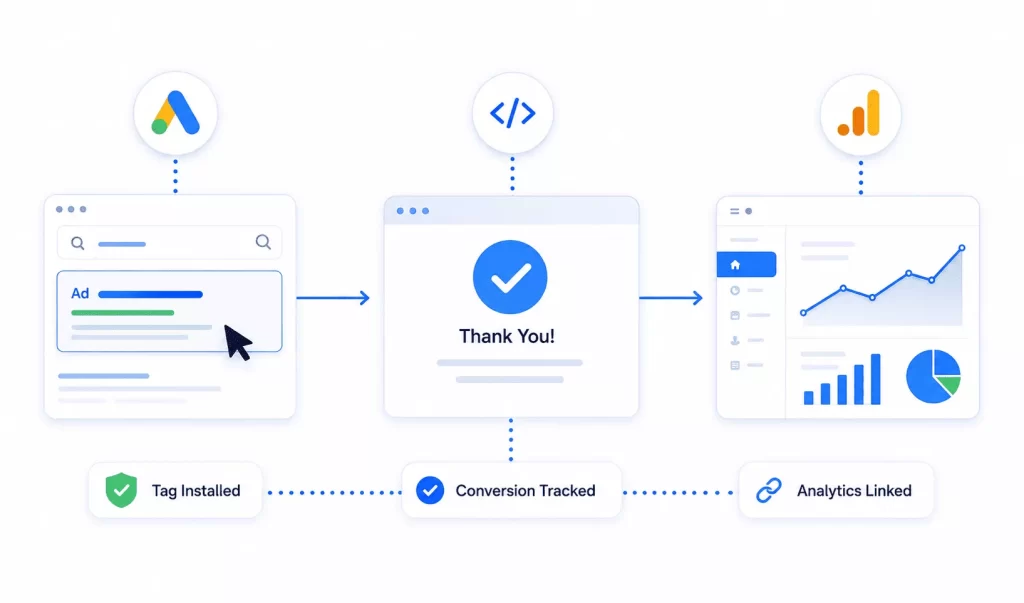
The first thing to check in any PPC audit is whether tracking tools are actually installed correctly across the site. Confirm the Google Ads conversion tracking tag is firing on the “Thank You” page after a purchase, since that’s how key metrics get measured properly. Without accurate tracking, there’s no reliable way to know which ads are actually driving conversions. Check that tools like Google Analytics are properly linked to your PPC campaigns too. A broken setup means missing data and weak campaign insight, which directly hurts optimisation and ROI.
2. Review Account Hierarchy Alongside Product Naming
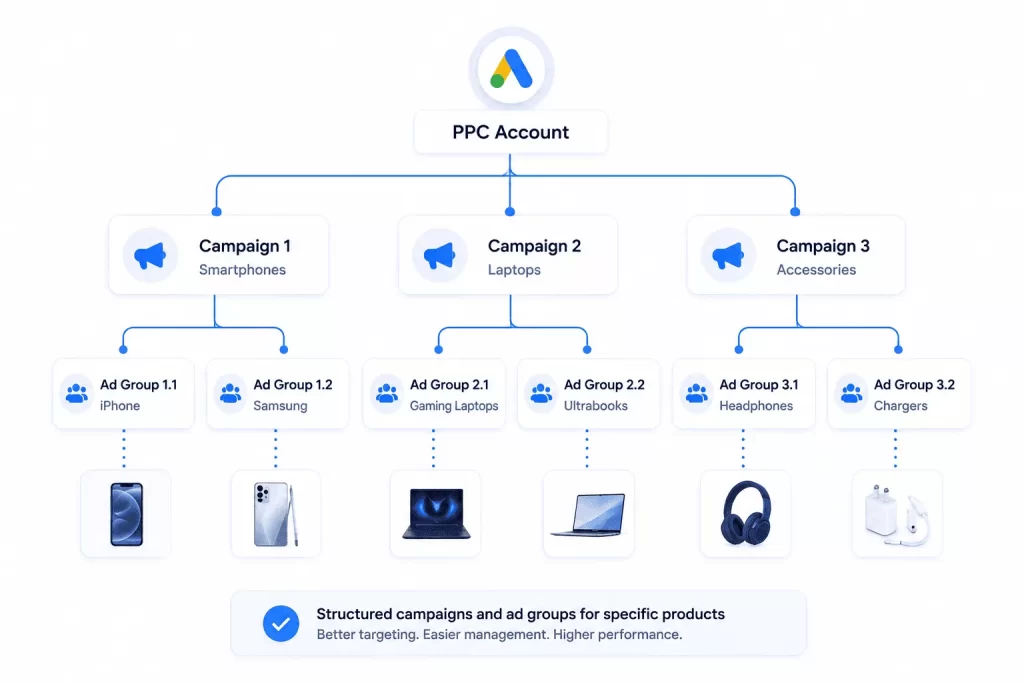
A clean account structure makes campaigns far easier to manage. Every campaign should have relevant ad groups targeting specific products. Take an electronics store running PPC, for example, it should be specific with targeting and build ad groups like “Smartphones” and “Laptops” rather than lumping everything together.
Give campaigns and ad groups descriptive names so there’s no confusion when reviewing account hierarchy later. One useful habit: organise by product or service so ads consistently show up against the right keywords.
3. Review Keywords and Targeting Settings
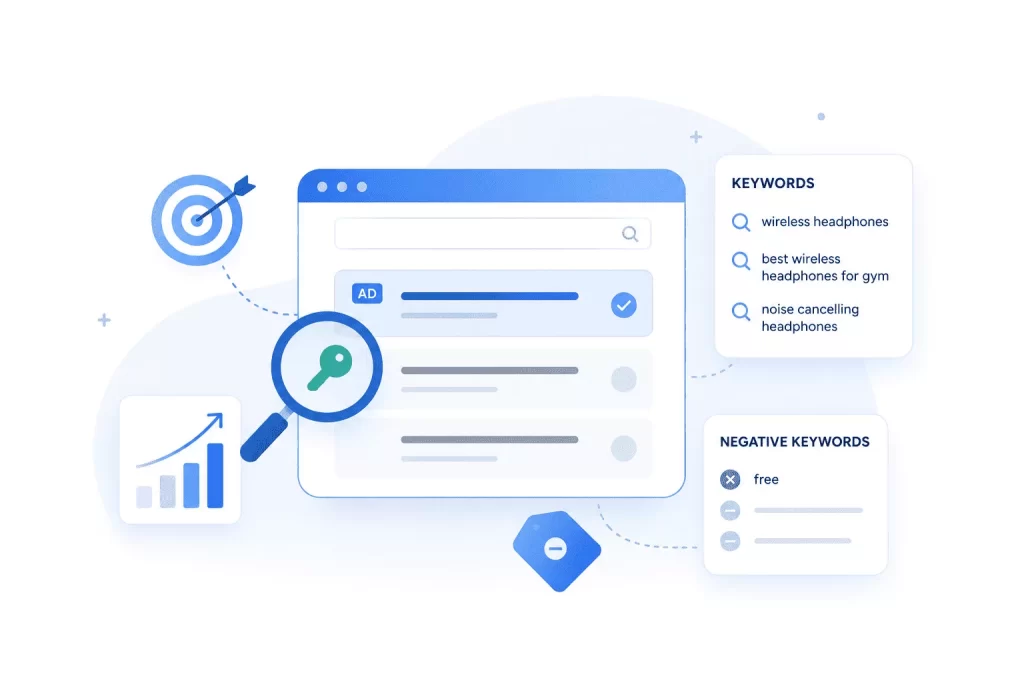
Keywords are arguably the most important lever in PPC. Target the wrong ones for your products or services and ad performance drops, even if reach looks fine, conversions won’t follow or generate real revenue.
If you’re selling wireless headphones, for instance, a specific phrase like “best wireless headphones for gym” pulls in far more relevant buyers than something generic. While doing PPC campaign analysis, don’t forget negative keywords either, adding “free” as a negative if you sell premium products keeps your ads away from bargain-hunters who were never going to convert. Keep refining the keyword list based on actual performance so traffic stays aligned with what’s likely to convert, and you’re not burning money on clicks that never had a shot.
4. Analyse Campaign Performance Within a Set Date Range
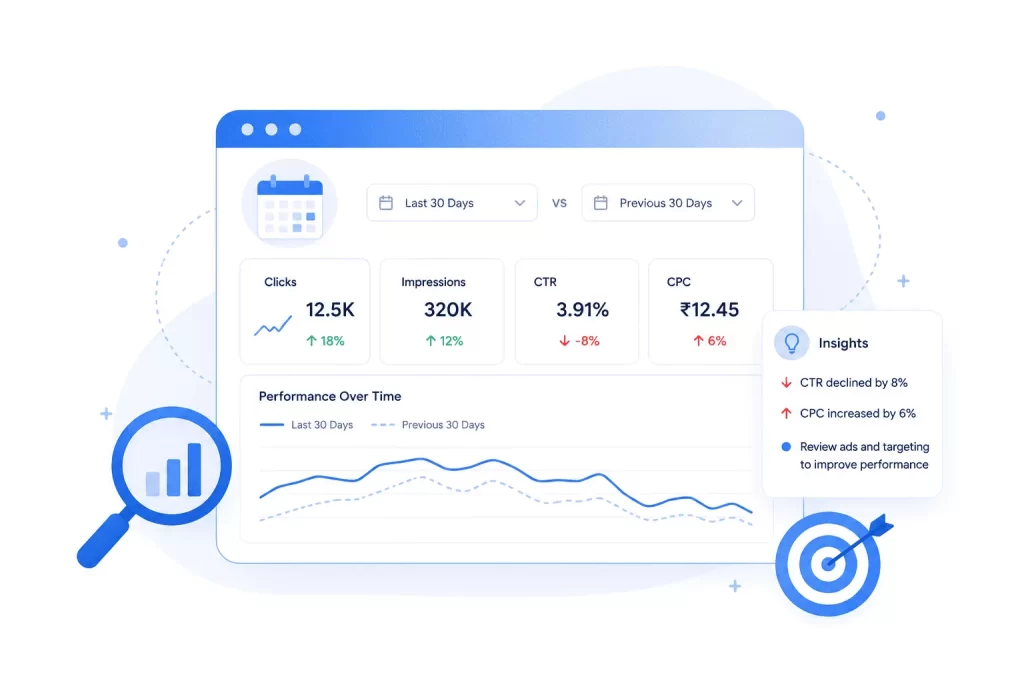
This step means reviewing how campaigns performed over a specific window, say, the last 30 days or a particular time segment.
Then compare that against the previous period. If performance has slipped, dig into why. Look at CTR and CPC to spot underperforming ads or keywords. Sharpening ad copy relevance or adjusting targeting can bring campaigns back on track for better returns.
5. Review Basic Campaign Settings
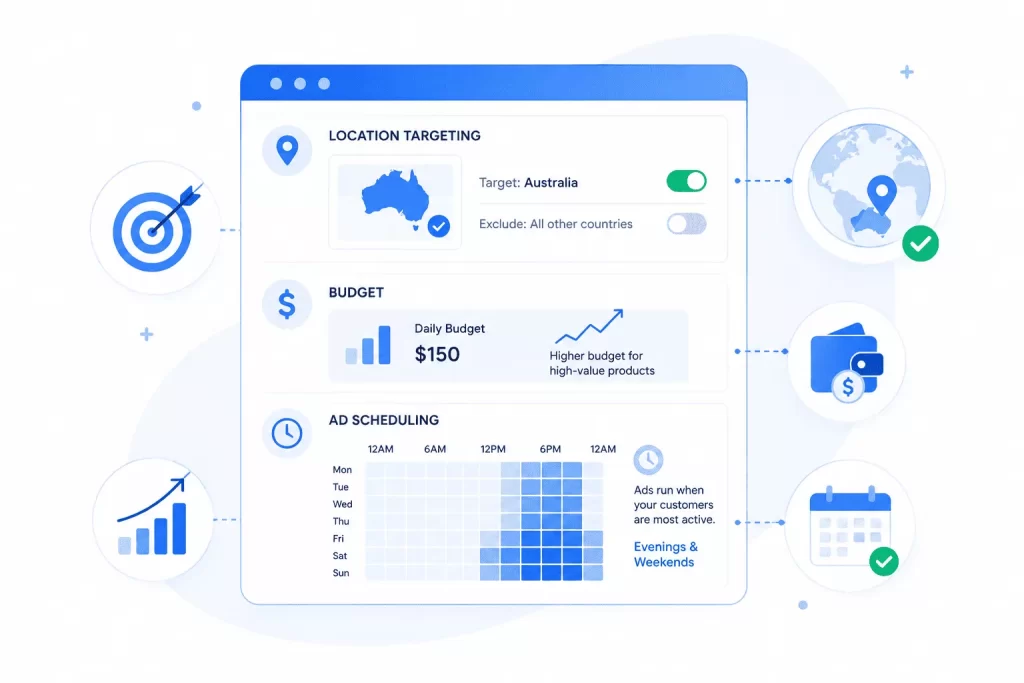
Start by checking where your ads are actually showing. If customers are based in Australia, make sure ads are only running there, otherwise budget gets wasted showing ads to people overseas who can’t even buy from you.
Next, think through budget. Higher-ticket items usually need more spend to reach genuinely serious buyers.
Also check ad scheduling. Ads should run when customers are actually online. Most shopping happens in the evenings and on weekends, so scheduling around that tends to pay off.
Quick tip: these settings matter more than they seem. Small adjustments can save real money and lift results. Ignore them, and budget gets burned showing ads to the wrong people at the wrong time. Worth staying on top of.
6. Review Ad Copy Relevance and Landing Page Content
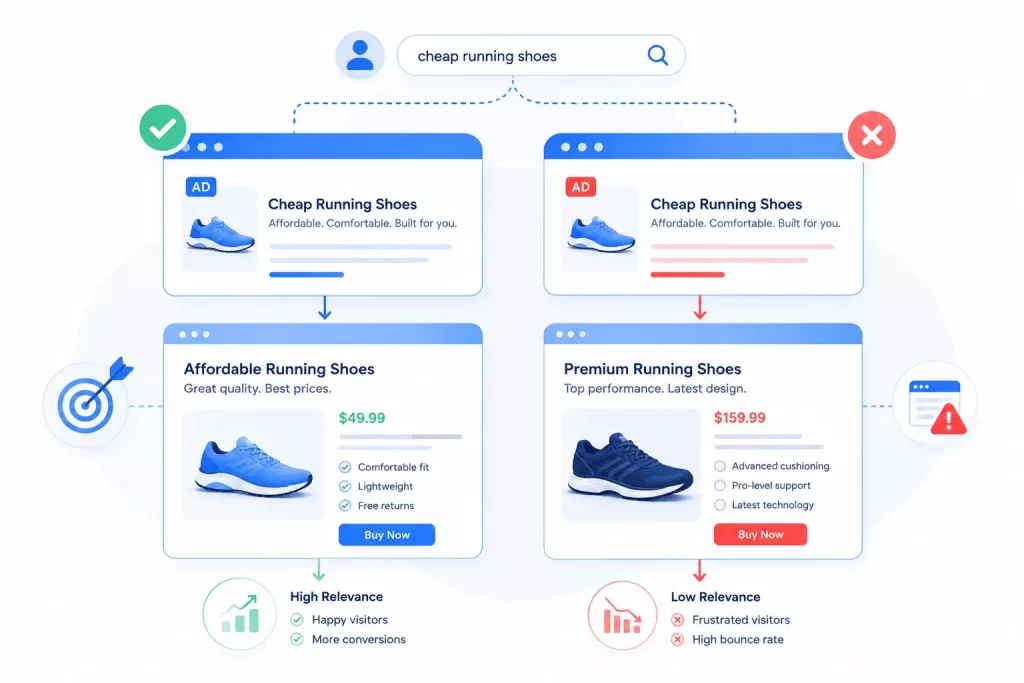
Always check that ad text actually matches what people are searching for.
The landing page matters just as much, it needs to deliver exactly what the ad promised. Someone clicking a “cheap running shoes” ad should land on a page showing affordable shoes, not premium ones or unrelated products.
When there’s a disconnect between ad and landing page, potential customers get frustrated and bounce fast, which means fewer sales. This mismatch has cost businesses thousands in wasted spend. Every click costs money, so make sure people land exactly where they expected to.
7. Analyse Bidding Strategies
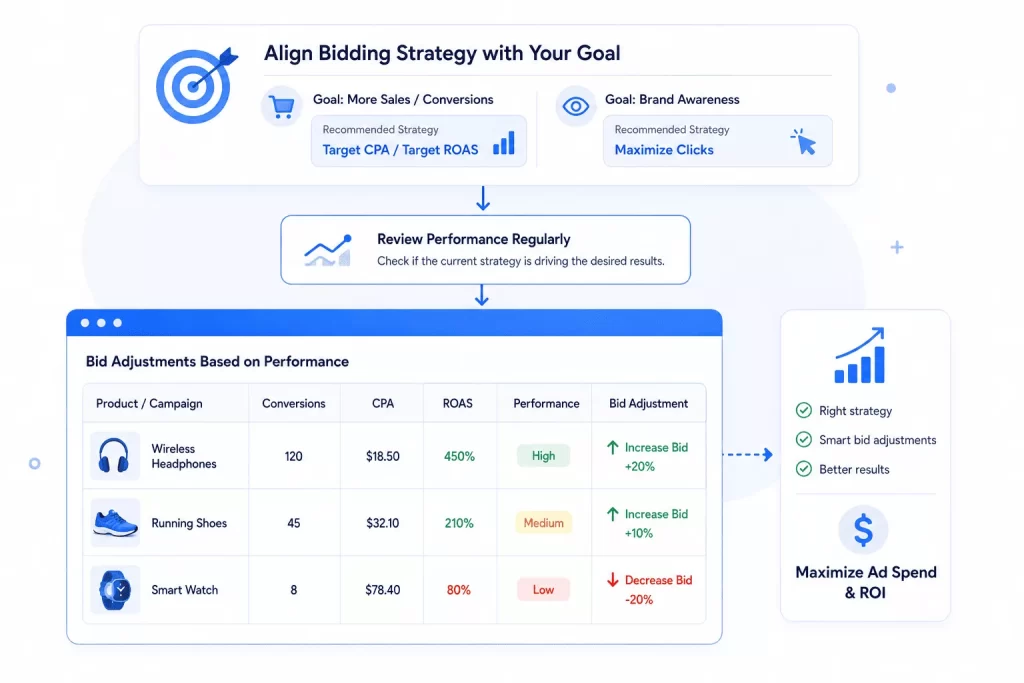
Aligning bidding strategy with actual goals is a core part of any PPC audit.
For most online businesses chasing more sales, Target CPA or Target ROAS tends to work well. If brand awareness is the priority instead, Maximize Clicks is often the better fit. Regularly check whether the current strategy is actually delivering the outcomes wanted, and adjust bids based on real performance data, pushing bids up on high-converting products and pulling back on the ones that aren’t earning their keep. That’s how ad spend gets maximised.
8. Inspect Ad Extensions
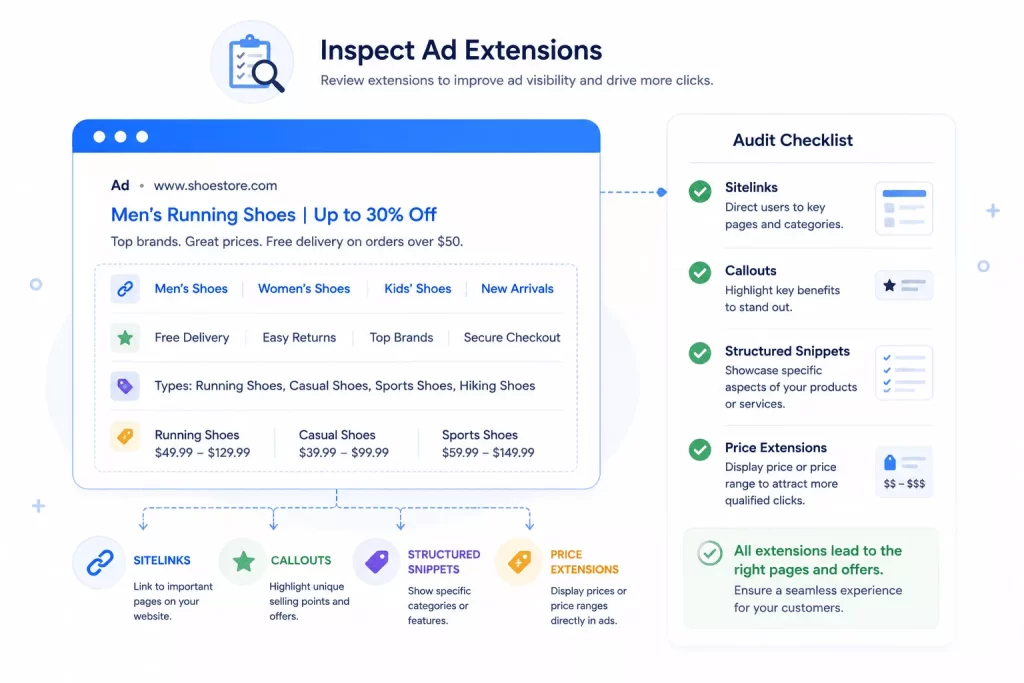
Review extensions like sitelinks, callouts, and structured snippets. A shoe retailer, for example, could use price extensions to show a discount or price range directly in the ad, making it stand out and pulling in more clicks. During the audit, confirm extensions are pointing to the right product pages or offers, so customers land exactly where the click promised.
9. Test and Review Your Ads Scripts
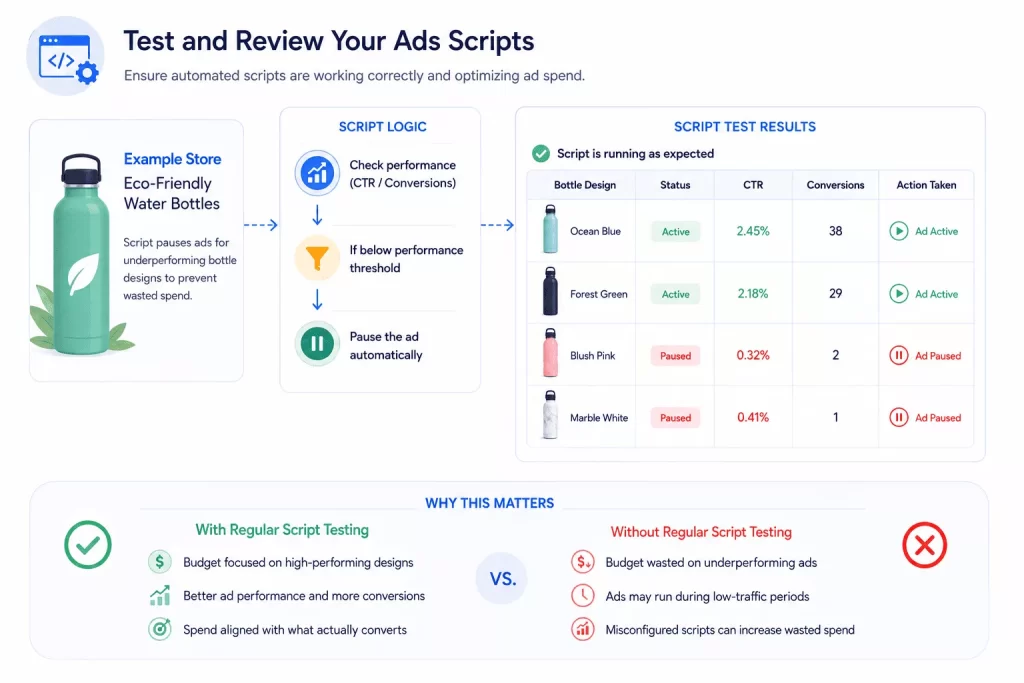
Say there’s an online store selling eco-friendly water bottles, with an automated script set up to pause ads that aren’t performing (specific bottle designs that aren’t getting clicks, for instance).
That script needs regular testing to confirm it’s actually doing its job, pausing ads for underperforming designs that are costing money without producing sales.
Skip this review and:
- Budget can end up going toward ads that simply don’t convert, like an unpopular design still running during peak shopping hours
- A misconfigured script might keep ads live during low-traffic periods, or accidentally boost spend on weak performers
Testing and adjusting scripts regularly keeps the right ads active and spend focused on what actually converts.
10. Analyse the Key Metrics (CTR, CPC, Conversion Rates)
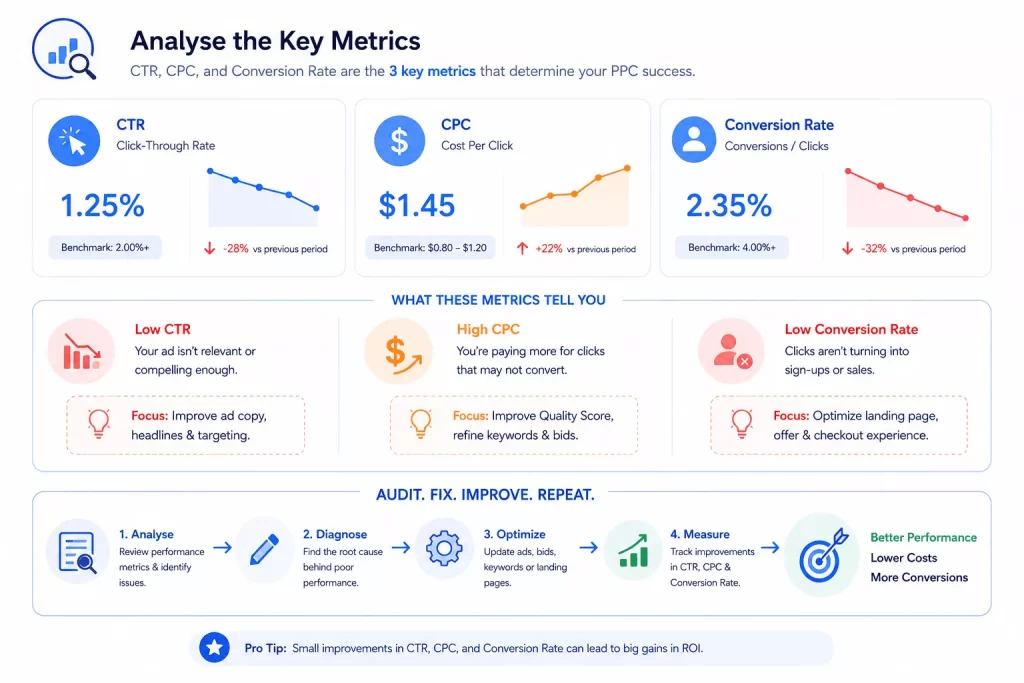
Three numbers matter most in a PPC audit: CTR, CPC, and conversion rate.
A fitness app ad with a low CTR means people aren’t clicking. A high CPC means paying too much for clicks that aren’t delivering value. Low conversion rates point to clicks not turning into sign-ups, which usually means the landing page or checkout needs work.
A proper account audit doesn’t stop at spotting these issues, it fixes them: revising ad copy, adjusting bids, or improving the landing page.
11. Check Your Remarketing Audiences
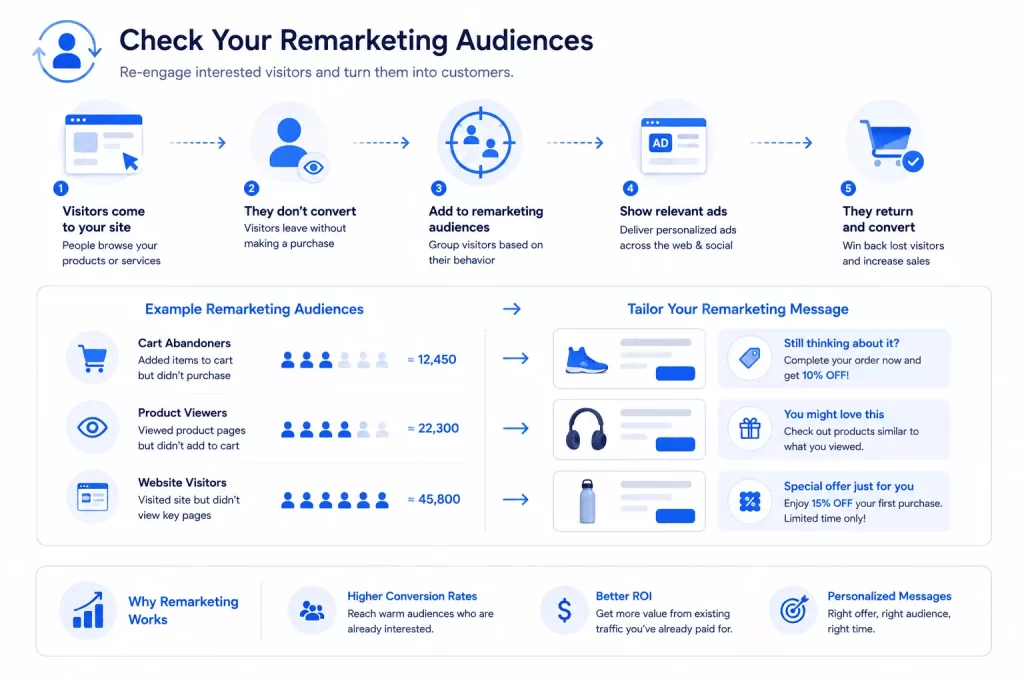
Moving into the final three steps, remarketing campaigns deserve a proper look. This is about re-engaging people who visited the site before but didn’t buy. For an eCommerce store, building segments like “cart abandoners” or “product viewers” makes it easier to bring those visitors back. Work out what they were interested in and tailor remarketing copy accordingly, a well-timed discount often does the trick. A sharp remarketing strategy consistently lifts conversion rates and gets better ROI out of traffic that’s already been paid for once.
12. Analyse Cross-Channel Impact
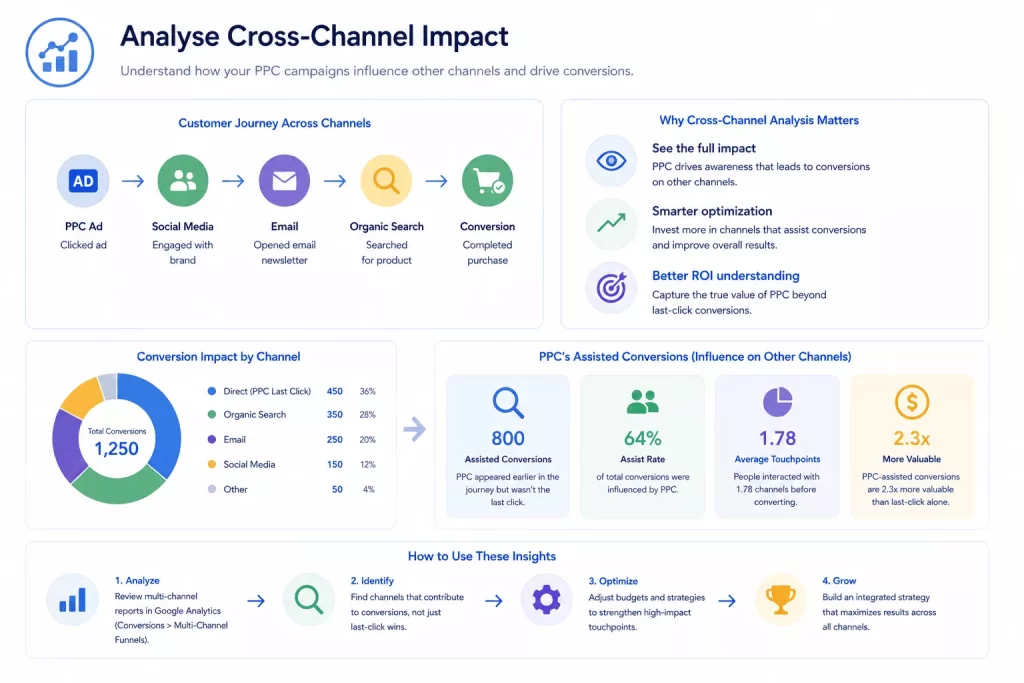
A PPC audit also needs to look at how paid campaigns are influencing other channels, social media, email, and organic search included. Google Analytics helps track cross-channel conversions and supports better optimisation decisions. This gives a fuller picture of what PPC is actually contributing beyond the immediate clicks and sales it generates directly.
13. Study Your Competitors’ Ads
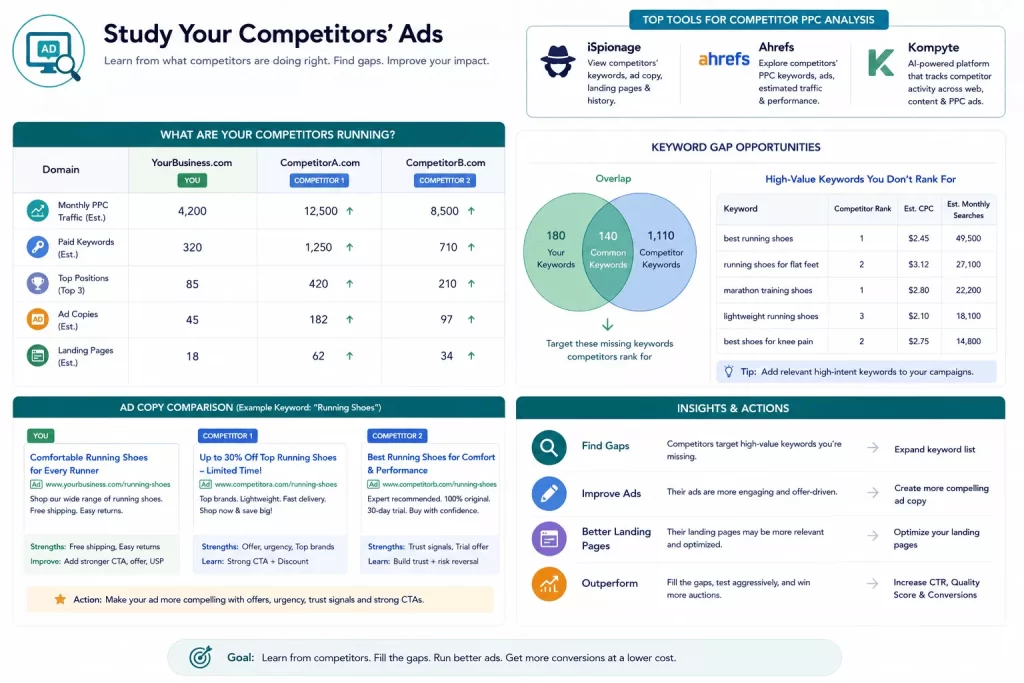
Take a close look at what competitors are running. If they’re ranking for keywords that aren’t yet part of the strategy, it’s worth considering adding them. A few tools worth using for competitor PPC analysis:
- iSpionage offers visibility into competitors’ keywords, ad copy, and landing pages
- Ahrefs, best known for SEO, also has solid data on competitors’ PPC ads, including keywords and performance
- Kompyte is an AI-driven tool that automatically tracks competitor activity across websites, content, and PPC ads
If competitor ads are simply more engaging, look at what can be improved. Spot the gaps in the current strategy and fill them.
What Does a PPC Audit Actually Deliver?
A PPC audit produces a thorough analysis of paid advertising campaigns. It’s about pinpointing what needs improvement and squeezing more ROI out of existing spend. A proper audit report acts as a roadmap for optimising campaigns going forward. Whether working with an internal team or an outside provider, expect at minimum:
- A clear account structure
- Keyword analysis
- Ad account review, including ad copy effectiveness
- Landing page experience assessment
- Targeting precision review
- A look at bidding strategy
- Performance metrics: CTR, conversion rate, ROAS
The report should also cover competitor strategy and check for policy compliance.
Crucially, a good audit doesn’t just diagnose, it prioritises recommendations and lays out an action plan for gaining an edge over competitors, complete with specific steps, timelines, and the resources needed to implement them.
Depending on scope, additional deliverables often include:
- A revised campaign structure
- Expanded keyword lists
- Optimised ad copy suggestions
- Landing page improvement recommendations
- Detailed competitor analysis
Getting More From Your Ad Budget With a PPC Audit
A PPC audit shows exactly where budget is leaking, helps sharpen targeting toward the right customers, and protects campaigns against algorithm shifts that could otherwise tank results overnight. From fixing broken tracking to fine-tuning strategy, every fix along the way makes ad spend work harder.
There’s no need to keep spending on ads that aren’t pulling their weight. A proper audit surfaces the kind of detail that changes how a campaign performs. Get in touch to arrange a free basic audit and see exactly where the opportunities are